Appearance
Agent Dashboard
Last updated: 2026–08-19
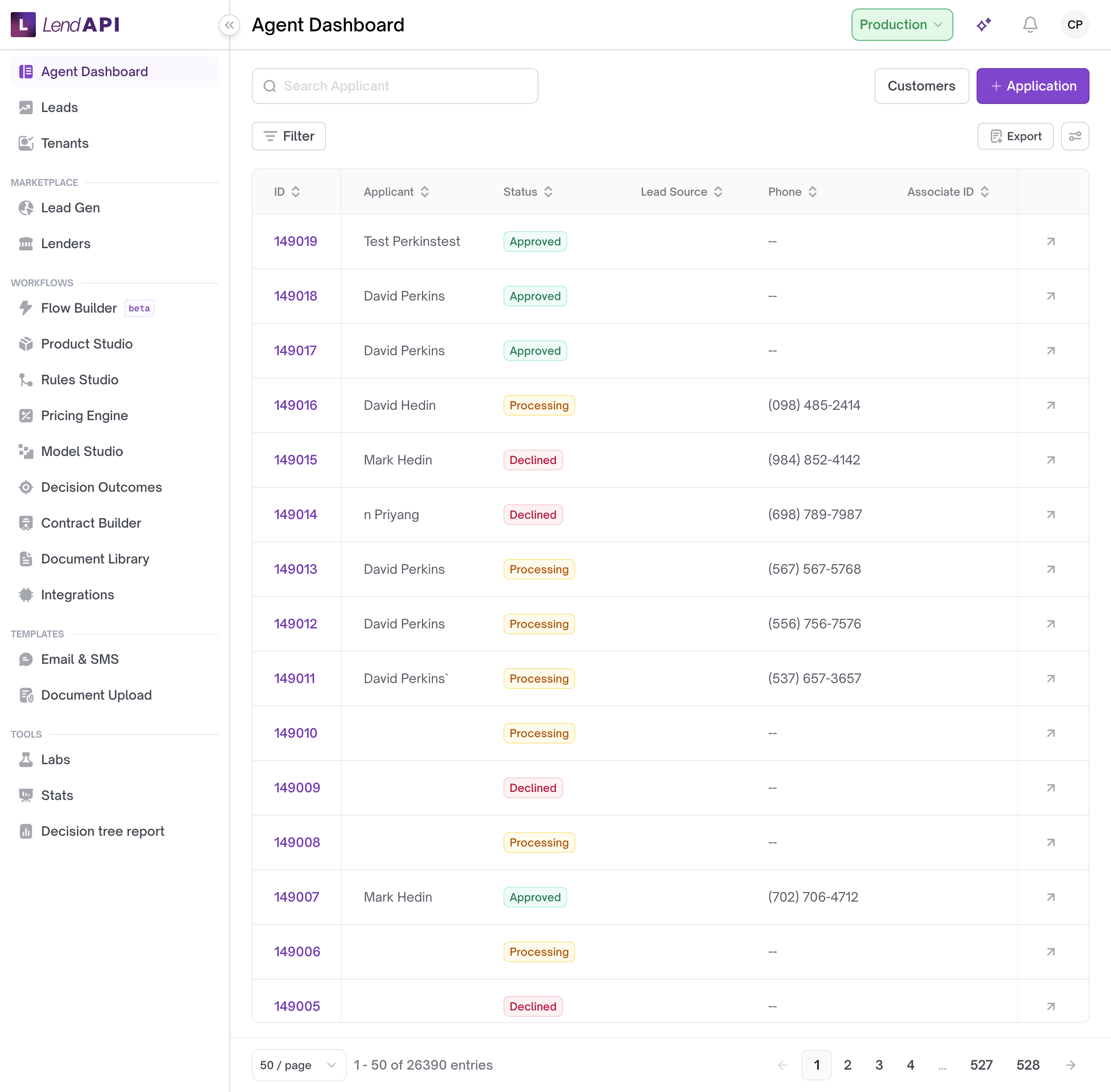
Agent Dashboard is the application queue: search, filter, open a file, review underwriting and offers, and assign or tag work. It gives operations staff, underwriters, and reviewers one place to work a loan file from intake to decision instead of tracking application IDs by hand. In the dashboard sidebar this item is labeled Agent Dashboard.
How it works
- The queue lists applications with fields like status, assignee, product, and tags. You can filter by tenant, status, assignee, product, tag, or lead source, search directly, and sort the list.
- Each application opens into a detail record with tabs covering underwriting (credit pull, decision flow trace, AI blocks) and offers (selected offer, eligible offers, manual offer).
- Sensitive fields — Social Security number, date of birth, address, and account number — appear masked on the record. You can reveal one of these fields and hide it again.
- You can tag and assign a file, add follow-up tasks with a due date and an assignee, and leave notes that support @mentioning a teammate.
- An offer document moves through versions with a status of Draft, Not Signed, Signed, or Generated. Only a Draft version keeps an editable body and variable values; the others are frozen.
- A selected offer can come from the system’s automatic selection or from a manual offer entered by staff. A manual offer record shows who made the selection and when.
- When multi-flow is enabled for a tenant, a parent application can show related child applications nested underneath it in the list.
Worked example
Dana, an underwriter at Meridian Credit Union, opens Agent Dashboard the morning after a batch of new applications came in. She filters the queue to product Personal Loan Standard and status In Review, then searches for the applicant name Maria Lopez. She opens application #48213.
On the Underwriting tab she reviews the credit pull — FICO 702 — and the decision flow trace. On the Offers tab she sees the system’s selected offer: $12,000 over 48 months from Summit Consumer Lending. Maria’s Social Security number is masked on the record; Dana reveals it to confirm it matches the credit bureau file, then hides it again.
Maria’s file is missing a recent pay stub. Dana tags the application “Docs Needed” and adds a task: “Request pay stub from applicant,” assigned to loan coordinator Priya Shah, due tomorrow. She also leaves a note on the file: “@Priya can you follow up by phone once the doc comes in?” The note stores Priya as a mentioned user alongside Dana’s comment.
The next day, the task shows up in Priya’s Today group. Once Priya has the pay stub, she marks the task complete. Because the task requires a writeback, she also records a yes/no answer confirming income was verified.
Use case
Northgate Credit Union runs three consumer loan products through LendAPI: Personal Loan Standard, Personal Loan Plus, and Auto Refinance. The operations manager wants each underwriter to own one product line, flag files that are stuck waiting on the applicant rather than ready for a decision, and make sure nothing falls through by end of day.
Each underwriter filters the queue to their product and the statuses they own. When a file is missing something from the applicant, they tag it — for example “Docs Needed” or “Income Verification” — so anyone scanning the list can see it without opening the file. They add a task with a due date for the specific follow-up step and assign it to whoever owns that next action, sometimes a loan coordinator rather than the underwriter. At the end of the day, each person checks their task list; anything still in the Today group hasn’t been done yet.
Add a follow-up task
- Open the application from the queue.
- Add a task: enter a description, choose who it’s assigned to, and set a due date.
- The task appears on the assignee’s task list, grouped as Today, Tomorrow, This Week, Upcoming, or No Due Date, based on the due date you set.
- When the work is done, mark the task complete. If the task requires a writeback, record the yes/no answer.
Reveal a masked field
- Open the field you need — Social Security number, date of birth, address, or account number. It appears masked.
- Reveal it to view the underlying value.
- Hide it again when you’re done.
Add a note and mention a teammate
- Open the notes area on the application.
- Write your note. To bring in a specific teammate, mention them by name.
- Save the note. It’s stored with the mentioned user attached to it, alongside your comment.
Best practices
- Start from the list or agent dashboard, then open one file. Do not work applications from a private list of IDs.
- Use filters (status, assignee, product, tags) before you scan. See List and filters.
- Assign and tag a file when more than one person will touch it. See Assigning and tags.
- Reveal masked fields (SSN, date of birth, address, account number) only when you need the value, and hide them again afterward.
- Use tasks with due dates for follow-up steps instead of tracking them in notes alone; they group automatically into Today, Tomorrow, This Week, Upcoming, and No Due Date.
- Use @mentions in a note when a specific person needs to see it, rather than relying on a tag alone.
- When you complete a task that requires a writeback, record the expected yes/no answer — it becomes part of the task’s record.
- Use a manual offer only to override the system’s selected offer. The record shows who made the manual selection and when.
- For a full originate-to-offer path, use Originate a personal loan.
In this section
- List and filters – View the application list, search, and filter by status, tenant, assignee, product, and tags.
- Agent dashboard – Applications list with configurable columns for agents (CSRs, underwriters, reviewers): available columns, selected columns, column picker, status summary, and typical workflows.
- Application detail – Detail view hub: tabs, Update Status, Overview panel, Auditor/sandbox notes, and links to per-tab guides.
- Underwriting tab – Credit pull, decision flow, offer table trace, and AI blocks.
- Offers tab – Selected offer, eligible offers, amortization, and manual offer.
- Assigning and tags – Assign applications to users and manage tags.